自托管nextcloud和onlyoffice
nextcloud有两种镜像(社区维护),一个是基于apache web server,一个是nextcloud:fpm,需要额外搭配一个webserver(如nginx)使用。我目前使用的是基于apache服务的镜像。除此之外,还有一个nextcloud-all-in-one镜像,由官方维护,之前试用了一下,里面配置太复杂,在反向代理的情况下无法开箱即用。
onlyoffice采用自己搭建的服务,理论上独立于nextcloud,可以和其他app集成。
services:
  # Note: MariaDB is external service. You can find more information about the configuration here:
  # https://hub.docker.com/_/mariadb
  db:
    # Note: Check the recommend version here: https://docs.nextcloud.com/server/latest/admin_manual/installation/system_requirements.html#server
    image: postgres:18
    restart: always
    volumes:
      - ~/app/nextcloud/pgdata:/var/lib/postgresql
    env_file:
      - .env

  # Note: Redis is an external service. You can find more information about the configuration here:
  # https://hub.docker.com/_/redis
  redis:
    image: redis:latest
    restart: always

  app:
    image: docker.1ms.run/library/nextcloud:latest
    restart: always
    ports:
      - 8080:80
    depends_on:
      - redis
      - db
    volumes:
      - ~/app/nextcloud/data:/var/www/html
      - ./000-default.conf:/etc/apache2/sites-available/000-default.conf:ro
    env_file:
      - .env
    environment:
      - POSTGRES_HOST=db
    extra_hosts:
      - "host.docker.internal:host-gateway"

  office:
    image: thomisus/onlyoffice-documentserver-unlimited:9.2.1
    restart: always
    ports:
      - "9980:80"
    volumes:
      - ~/app/onlyoffice/logs:/var/log/onlyoffice
      - ~/app/onlyoffice/data:/var/www/onlyoffice/Data
      - ~/app/onlyoffice/lib:/var/lib/onlyoffice
      - ~/app/onlyoffice/db:/var/lib/postgresql
    environment:
      - JWT_ENABLED=true
      - JWT_SECRET=${OO_JWT_SECRET}
- ALLOW_PRIVATE_IP_ADDRESS=true.env文件包含:
- postgres数据库配置:POSTGRES_DB/POSTGRES_USER/POSTGRES_PASSWORD
- 时区配置:TZ=Asia/Shanghai
- nextcloud默认管理账户:NEXTCLOUD_ADMIN_USER/NEXTCLOUD_ADMIN_PASSWORD
- onlyoffice的认证令牌:OO_JWT_SECRET
一些参考:
- onlyoffice维护的与nextcloud:fpm联动的配置样例:docker-compose.yml
- onlyoffice提供的与nextcloud集成部署的反向代理文档
- onlyoffice反代文档,里面haproxy版本太老,而且缺少一个重要的配置1!看下面配置
- nextcloud文档,目前用haproxy反代nextcloud(subpath)没有成功,等过几天看看吧,这个教程可以参考
注意:
- onlyoffice部署好之后,要能够和nextcloud双向通信。除此之外,如果nextcloud发布到公网,则任何访问nextcloud的客户端(endpoint)都需要能够访问onlyoffice!也就是说,如果将nextcloud反代到公网,onlyoffice也需要反代到公网。
- nextcloud安装onlyoffice app,如果碰到网络问题,可以自己到nextcloud应用商店下载好,传到服务器离线安装。
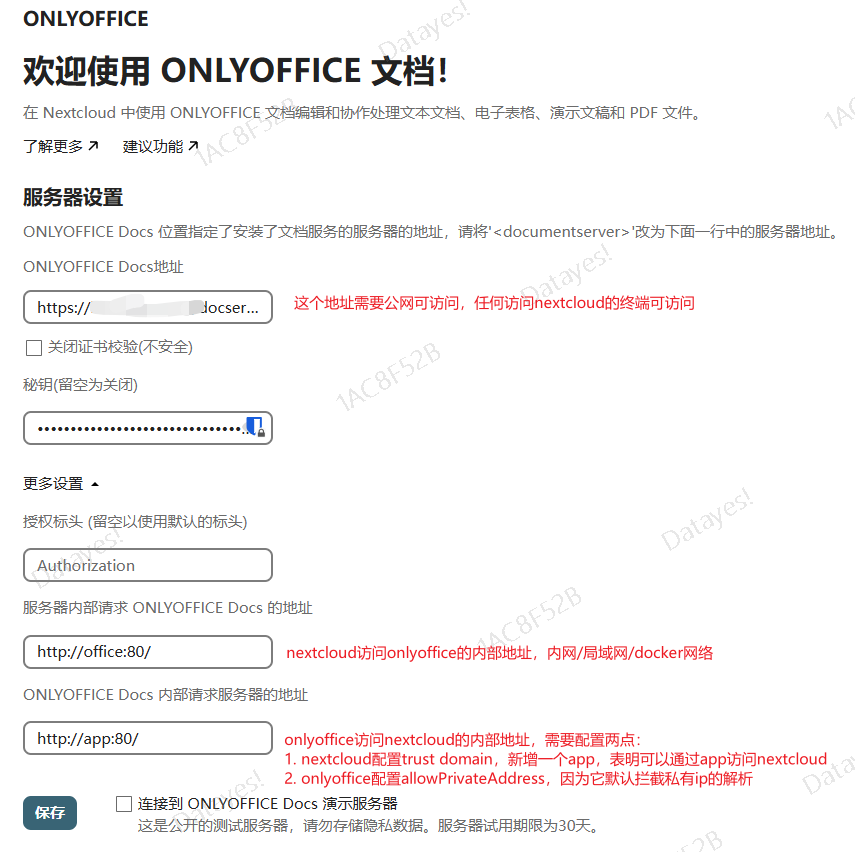
haproxy反代onlyoffice配置:
frontend  main
    bind :5000
    mode                 http
    log                  global
    option               httplog
    option               dontlognull
    option forwardfor    except 127.0.0.0/8
    maxconn              8000
    timeout              client  30s

    acl app-onlyoffice      path           -i /docserver
    acl app-onlyoffice      path_beg       -i /docserver/
    use_backend onlyoffice        if app-onlyoffice

backend onlyoffice
    mode        http
    option http-server-close
    option forwardfor

    # see: https://github.com/ONLYOFFICE/document-server-proxy/blob/master/haproxy/proxy-to-virtual-path.cfg
    acl existing-x-forwarded-host req.hdr(X-Forwarded-Host) -m found
    http-request add-header X-Forwarded-Host %[req.hdr(Host)]/docserver unless existing-x-forwarded-host
    # reqrep ^([^\ :]*)\ /docserver/(.*)     \1\ /\2
    http-request replace-path ^/docserver/?(.*) /\1

    # http-request set-header Host %[req.hdr(host)]
    # http-request set-header X-Real-IP %[src]
    # http-request set-header X-Forwarded-For %[src]
    # http-request set-header X-Forwarded-Proto %[hdr(X-Forwarded-Proto),lower]
    # This is essential! take a look at nginx conf inside onlyoffice container, it use this X-Forwarded-Prefix!
    http-request set-header X-Forwarded-Prefix /docserver

    server  app1 127.0.0.1:9980 check maxconn 30
Nextcloud反向代理于subpath
经过一番折腾,看文档,终于成功以subpath的形式反代成功nextcloud。其实官方文档2已经指出apache镜像如何部署在subdir上。不过这次我选择了fpm镜像,因为更小,我的小弱机磁盘空间已经不充裕了。选用fpm镜像,主要就得参考社区镜像文档了。
参考社区镜像github文档,创建compose.yml
services:
  # Note: MariaDB is external service. You can find more information about the configuration here:
  # https://hub.docker.com/_/mariadb
  db:
    # Note: Check the recommend version here: https://docs.nextcloud.com/server/latest/admin_manual/installation/system_requirements.html#server
    image: postgres:18
    restart: always
    volumes:
      - ./pgdata:/var/lib/postgresql
    env_file:
      - .env

  # Note: Redis is an external service. You can find more information about the configuration here:
  # https://hub.docker.com/_/redis
  redis:
    image: redis:latest
    restart: always

  app:
    image: docker.1ms.run/library/nextcloud:32-fpm-alpine
    restart: always
    # ports:
    #   - 9000:80
    depends_on:
      - redis
      - db
    volumes:
      - ./app_data:/var/www/html
      - ./nc-postinstall:/docker-entrypoint-hooks.d/post-installation
    env_file:
      - .env
    environment:
      - POSTGRES_HOST=db
    extra_hosts:
      - "host.docker.internal:host-gateway"

  web:
    container_name: nginx-server
    image: docker.1ms.run/library/nginx:alpine-slim
    restart: always
    depends_on:
      - app
    ports:
      - 7080:80
    volumes:
      - ./nginx-entry-wrap.sh:/docker-entrypoint.d/99-adduser.sh:ro
      - ./nginx.conf:/etc/nginx/nginx.conf
      - ./nextcloud-subpath.conf:/etc/nginx/nextcloud-subpath.conf
- ./app_data:/var/www/nextcloudnginx反向代理nextcloud配置,也能在官方文档中找到。值得注意的是,如果要将nextcloud部署于http://baseurl/nextcloud下,那么就要将其安装在/var/www/nextcloud下,而镜像中的默认安装目录是/var/www/html,所以可以在/var/www下创建一个符号链接名为nextcloud指向html,对于nginx容器,直接将/var/www/html数据卷挂载于/var/www/nextcloud即可。
Attention
注意上面的配置,完全没有开启https,如果要暴露到公网,必须配置https。
我的方法是nginx前面还有一道反向代理(haproxy)用于处理https,所以内部用http就足够了。
Footnotes
-
因为我用的那个onlyoffice镜像实际上内含一个nginx,看里面配置用到了X-Forwarded-Prefix,就是onyloffice的subpath,这个传进去才能正常工作。 ↩